
Training
Your weekly plan and every practice
Plan your practice week and start each session from here.
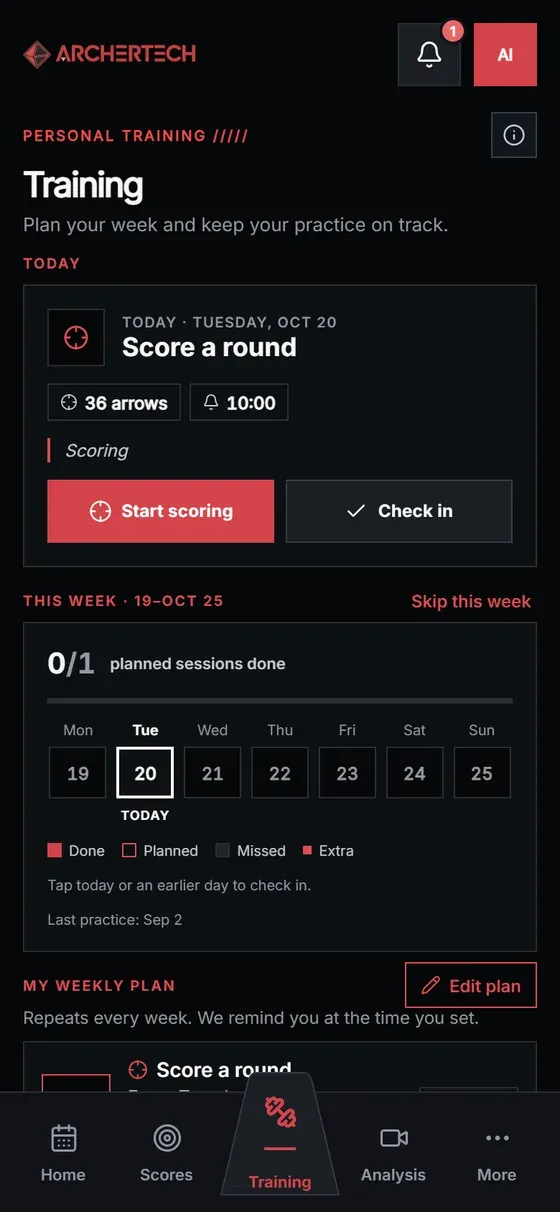
On this screen
- Personal trainingThe PERSONAL TRAINING heading, with a one-line summary of this page.
- TodayWhat your plan sets for today, with buttons to start it or check in. On a rest day it names your next session.
- This weekToday has a white frame and TODAY; planned days have a red frame and their practice icon. The legend explains Done, Planned, Missed and Extra.
- My weekly planEach practice day as a weekly habit (Every Tuesday), with when it comes next and its reminder; Edit plan changes them.
- Start a practiceScore a round, Record technique and Quick duel open straight away; Check in a practice logs one done away from the app.
- Training logThis week’s sessions, arrows and days, then every scorecard, video, duel and check-in of the last 14 days by day.
Set your weekly plan
- Tap Plan my week, or Edit plan once you have a plan.
- Tap the days you practise under Practice days, then choose a practice for each.
- Add arrows, a note or a reminder time if you like, then tap Save plan.
What you can do here
- When notifications are on, we remind you at the time you set, unless you have already practised that day.
- Turn on notifications and the training reminder in Settings to get reminders on this device.
- Practised away from the app? Tap Check in, or tap a day in This week up to today; Undo check-in removes it. Skip this week pauses the plan without breaking your streak.
Follow your coach’s plan and log every session. Your coach reviews every log.
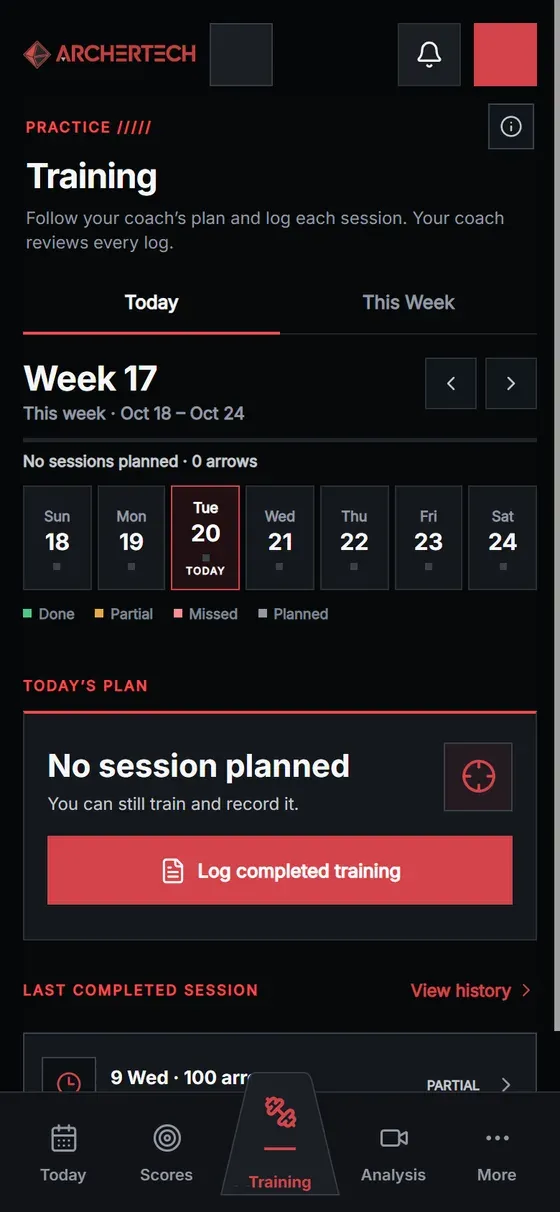
On this screen
- Training headingThe PRACTICE heading, with a reminder that your coach reviews every log.
- Today and week tabsSwitch between Today and This Week, and move between weeks with the arrows.
- Today’s planEach unit shows its target, RPE and minutes; tap one to see your coach’s focus.
- Check in trainingTap Check in training, or Log this day for a past day, to log your session.
- This WeekEvery day’s plan and status at a glance, with your Weekly load total below.
Log a session
- On Today, tap Check in training, or Log this day for a past day.
- Choose Full session or Part of it. Without a plan, pick what you worked on.
- Set the arrows, the minutes and how hard it was (RPE 1 to 10).
- Tap Save training. Saving today’s log also marks you present.
Read the plan
- Each unit shows its target, RPE and minutes; open it for your coach’s focus.
- This Week shows every day’s plan and status.
- Training load is minutes × effort (RPE); Weekly load adds up the week.
Fix a log
- Tap Edit on the recorded session, change it and save.
Today’s team sessions, changes for single athletes, and what athletes logged.
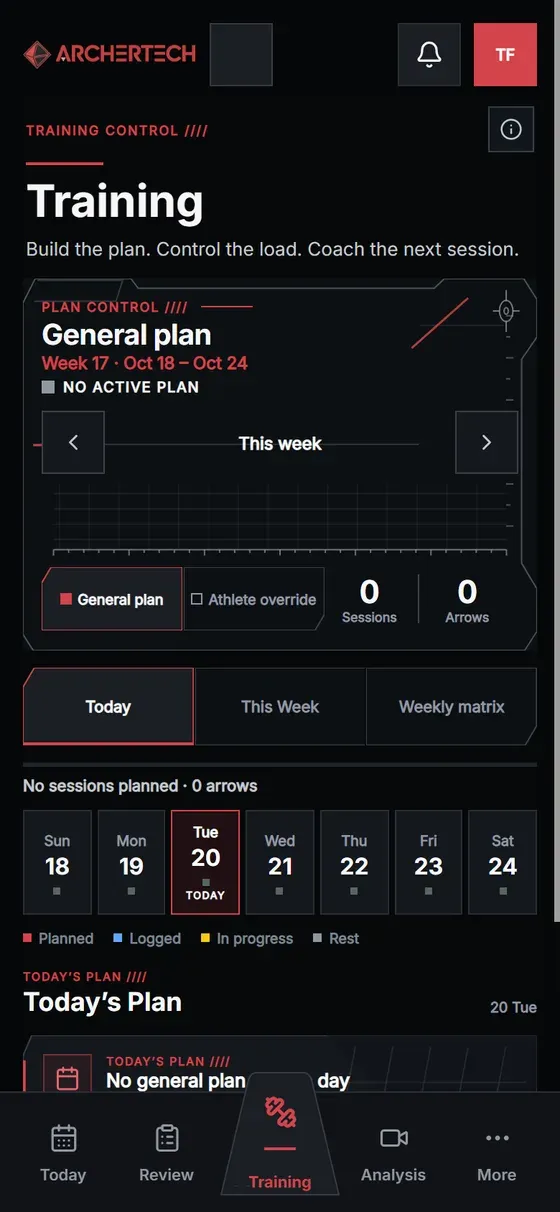
On this screen
- Training controlThe TRAINING CONTROL heading, with a one-line summary of this page.
- Plan controlPLAN CONTROL picks General plan or Athlete override and the week, and counts sessions and arrows.
- Training tabsToday, This Week and Weekly matrix switch between the day, the week and the grid.
- Today’s planUnits for the day; logged ones show SESSION RECORDED. Coaches tap to edit or drag to reorder.
- Add componentAdd component adds a unit to the plan, and athletes see it right away.
Build the team plan
- In PLAN CONTROL, choose General plan and the week.
- Tap Add component and step through time slot, component, load, arrows, duration, RPE, title and notes.
- Tap Add training component. Athletes see it right away; there is no separate publish step.
- Tap a unit to edit it, or drag its handle to change the order athletes see.
Adjust for one athlete
- Choose Athlete override and search for the athlete.
- Tap Override and change the session.
- Tap Save athlete override.
- To undo it, tap Remove override and use general plan.
Plan the week
- Open This Week and tap a day to edit it: day type, template, arrows, minutes and RPE.
- Week actions copies a day, sets a rest day, copies the week or prepares the next one.
- Weekly matrix lays out components across the week; tap a square to plan a time slot.
Check what athletes logged
- When an athlete has logged, the unit shows SESSION RECORDED with their result.
- Athletes create their own logs; coaches can edit a logged session.
Today’s team sessions, changes for single athletes, and what athletes logged.
On this screen
- Training controlThe TRAINING CONTROL heading, with a one-line summary of this page.
- Plan controlPLAN CONTROL picks General plan or Athlete override and the week, and counts sessions and arrows.
- Training tabsToday, This Week and Weekly matrix switch between the day, the week and the grid.
- Today’s planUnits for the day; logged ones show SESSION RECORDED. Coaches tap to edit or drag to reorder.
- Add componentAdd component adds a unit to the plan, and athletes see it right away.
Check what athletes logged
- When an athlete has logged, the unit shows SESSION RECORDED with their result.
- Athletes create their own logs; coaches can edit a logged session.
What a manager can’t do here
- Managers see the plan, the week and the logs, but can’t create, edit, reorder or override sessions.