
Home
Find a club and keep training on your own
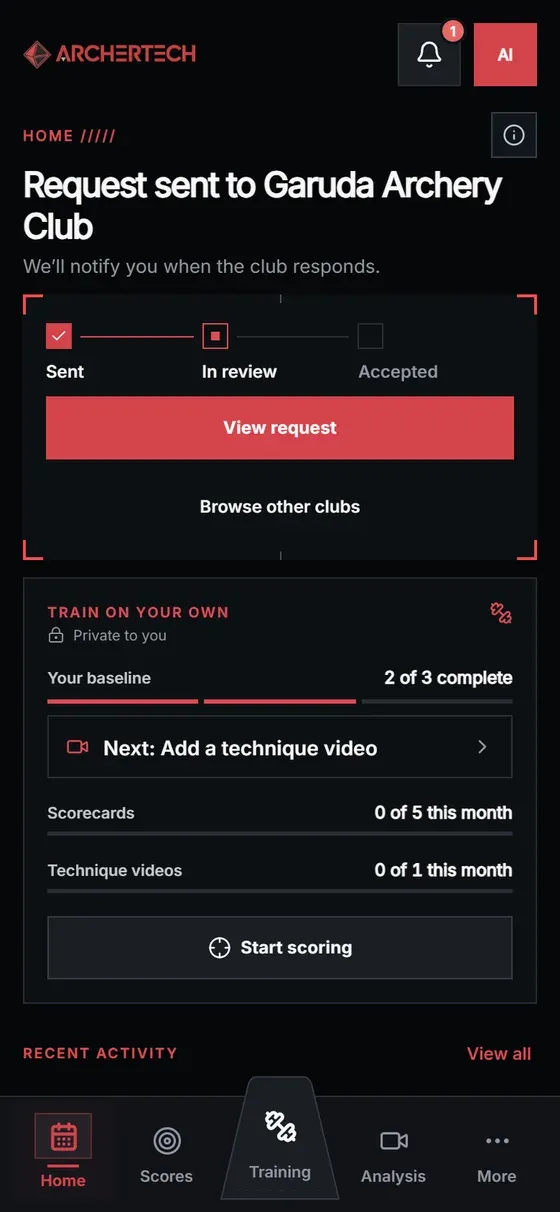
Your private starting point: find a club to train with, and keep training on your own in the meantime.
On this screen
- Find your clubSearch clubs or countries. The count shows how many clubs are open to new archers; See all clubs opens the directory.
- Request statusAfter you ask to join, the search becomes a tracker: Sent, In review and Accepted, with View request.
- Train on your ownYour baseline and its next step, this month’s scorecards and technique videos, and Start scoring.
- Recent activityYour latest scores and videos; View all shows the rest.
Find a club
- Type a club name or a country under Find your club and tap the search button.
- The club directory opens with your search already filled in.
- Tap See all clubs to browse every club open to new archers.
While your request is pending
- Home shows Request sent to the club, with In review as the current stage.
- Tap View request to check it, or Browse other clubs to keep looking.
Train on your own
- Under Your baseline, tap the next step: complete your athlete profile, record your first score or add a technique video.
- Tap Start scoring to record a round at any time.
Your monthly allowance
- Scorecards and technique videos show how many you have used this month, or Unlimited.
- When a limit is reached, tap View plan to see plans with more room.
- Recent activity lists your latest scores and videos; View all shows the rest.
Your daily starting point: check in, see your coach’s session and keep your season goal in view.
On this screen
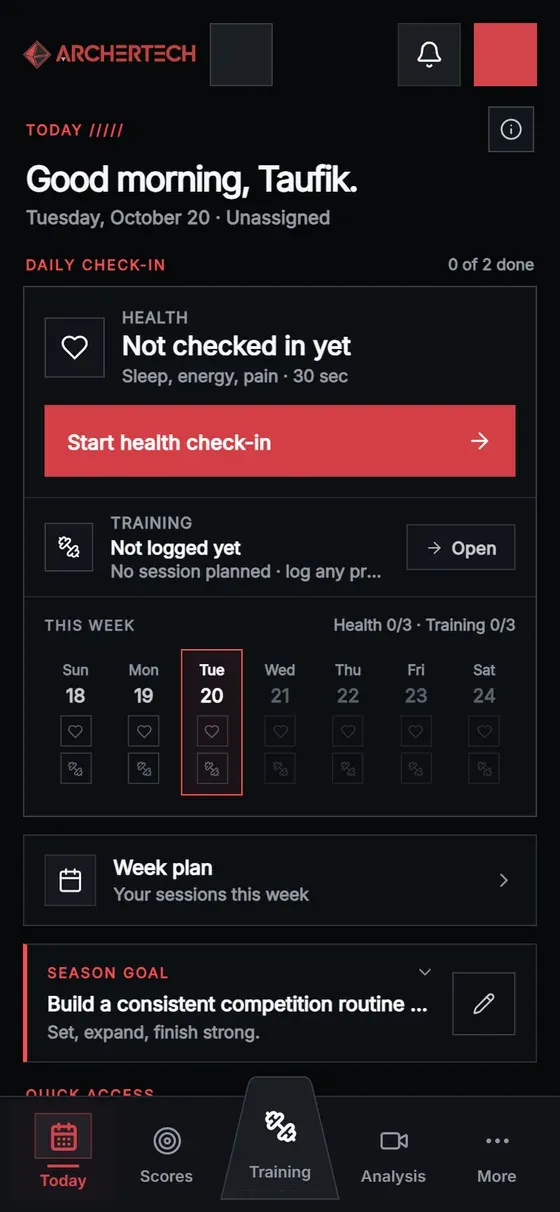
- Daily check-inDAILY CHECK-IN lists Health, Training and Scorecard rows, each marked done or not yet.
- This weekTHIS WEEK marks the days you checked in and counts your check-in streak.
- Coach sessionCOACH SESSION shows today’s plan with Open in Training; Week plan opens your whole week.
- Season goalSEASON GOAL holds your goal and focus cue; the pencil icon edits them.
- Quick accessQUICK ACCESS opens Score, Notes, Message and Feedback in one tap.
Do your daily check-in
- Under DAILY CHECK-IN, tap Start health check-in.
- Answer how you feel, mark any pain on the body map, then choose whether you can train: Full plan, Modified or No shooting.
- Tap Save check-in. Your coach can now review it.
- After your session, tap Log today’s training. On days with scoring planned, Record scorecard appears too.
Follow your coach’s session
- The COACH SESSION card shows today’s plan; tap Open in Training for the details.
- THIS WEEK shows your check-in days and your check-in streak.
- When your coach replies, New feedback from your coach appears at the top.
Set your season goal
- Tap Set Season Goal, or Edit Season Goal to change it.
- Write your goal and a short focus cue.
- Tap Save goal. Your coach sees it on your passport.
Quick access
- Score, Notes, Message and Feedback open those tools in one tap.
Your team’s day on one screen: readiness, attendance, today’s training and what needs you next.
On this screen
- Greeting and scopeA greeting, today’s date and a line showing whether you see the full team or assigned athletes.
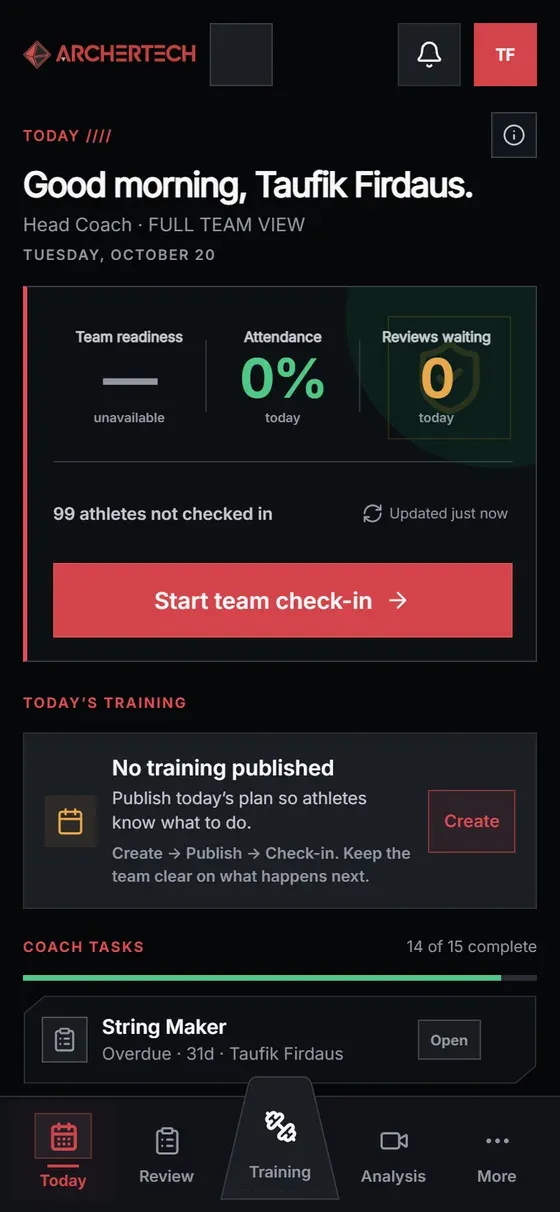
- Team overviewTeam readiness, Attendance and Reviews waiting sum up the day, with Start team check-in below.
- Today’s trainingToday’s training shows the plan’s blocks and Open today’s training, or No training published.
- Coach tasksCoach tasks lists open tasks with a count of how many are complete.
- Quick actionsQuick actions start Log score, Create task, Add athlete and Broadcast Message in one tap.
Read the team overview
- Team readiness, Attendance and Reviews waiting sum up today.
- A head coach and a manager see the whole team; a coach sees the athletes assigned to them.
Take team attendance
- Tap Start team check-in.
- Find each athlete and mark Present or Absent.
- Enter the arrows each athlete shot, if you track them.
- Use the date switcher to fix another day, then tap Save.
Run today’s session
- Tap Open today’s training to see the plan, or Create today’s training when nothing is planned.
- While the session runs, the card offers Finish session and Session notes.
- After the session, Review today brings attendance, notes and reviews together.
Quick actions
- Log score, Create task, Add athlete and Broadcast Message start the most common jobs in one tap.
Your team’s day on one screen: readiness, attendance, today’s training and what needs you next.
On this screen
- Greeting and scopeA greeting, today’s date and a line showing whether you see the full team or assigned athletes.
- Team overviewTeam readiness, Attendance and Reviews waiting sum up the day, with Start team check-in below.
- Today’s trainingToday’s training shows the plan’s blocks and Open today’s training, or No training published.
- Coach tasksCoach tasks lists open tasks with a count of how many are complete.
- Quick actionsQuick actions start Log score, Create task, Add athlete and Broadcast Message in one tap.
Read the team overview
- Team readiness, Attendance and Reviews waiting sum up today.
- A head coach and a manager see the whole team; a coach sees the athletes assigned to them.
Take team attendance
- Tap Start team check-in.
- Find each athlete and mark Present or Absent.
- Enter the arrows each athlete shot, if you track them.
- Use the date switcher to fix another day, then tap Save.
What a manager can’t do here
- Training plans and scores are recorded by coaches; their buttons open those screens for you to follow.