
Target Group Scoring
Score 2 to 4 athletes on one target
Score 2 to 4 athletes shooting at one target without switching scorecards after every arrow.
On this screen
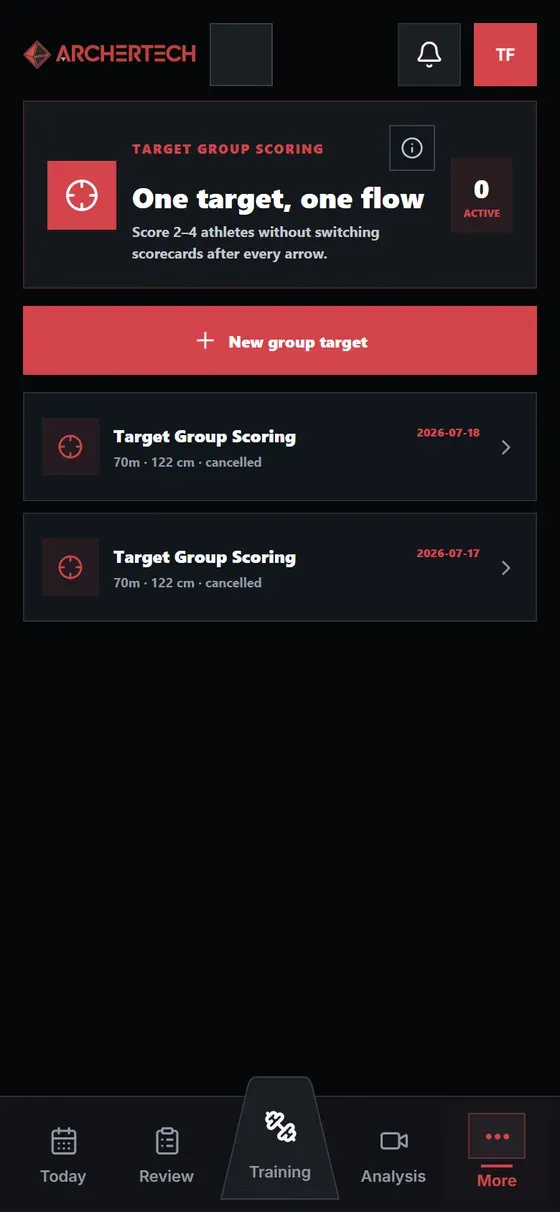
- Group scoring headerA header explains the idea and counts your ACTIVE group targets.
- New group targetOpens the setup form for a new shared target.
- Create target sessionSession name, date, distance, target face, arrows, ends and privacy, then 2 to 4 athletes.
- Target sessionsYour group targets, active and finished; tap one to reopen it.
- Live target boardTap a lane, score on the pad, then tap Finish & save.
Run a group target
- Tap New group target.
- Name the session and set the date, distance, target face, arrows per end and ends, and whether scores stay private or are club visible.
- Search and select 2 to 4 athletes, then tap Create live target.
- Tap a lane to choose the athlete, then tap their score on the pad. Every arrow saves straight away; Undo removes the last one.
- Tap Finish & save. Each athlete with arrows gets their own scorecard.
Good to know
- Group scoring needs a connection.
- Reopen a session from Target sessions.
Score 2 to 4 athletes shooting at one target without switching scorecards after every arrow.
On this screen
- Group scoring headerA header explains the idea and counts your ACTIVE group targets.
- New group targetOpens the setup form for a new shared target.
- Create target sessionSession name, date, distance, target face, arrows, ends and privacy, then 2 to 4 athletes.
- Target sessionsYour group targets, active and finished; tap one to reopen it.
- Live target boardTap a lane, score on the pad, then tap Finish & save.
Run a group target
- Tap New group target.
- Name the session and set the date, distance, target face, arrows per end and ends, and whether scores stay private or are club visible.
- Search and select 2 to 4 athletes, then tap Create live target.
- Tap a lane to choose the athlete, then tap their score on the pad. Every arrow saves straight away; Undo removes the last one.
- Tap Finish & save. Each athlete with arrows gets their own scorecard.
Good to know
- Group scoring needs a connection.
- Reopen a session from Target sessions.