
Review
Decisions waiting on check-ins, logs and scorecards
Every decision waiting for the coaching team: health check-ins, training logs and scorecards athletes submit.
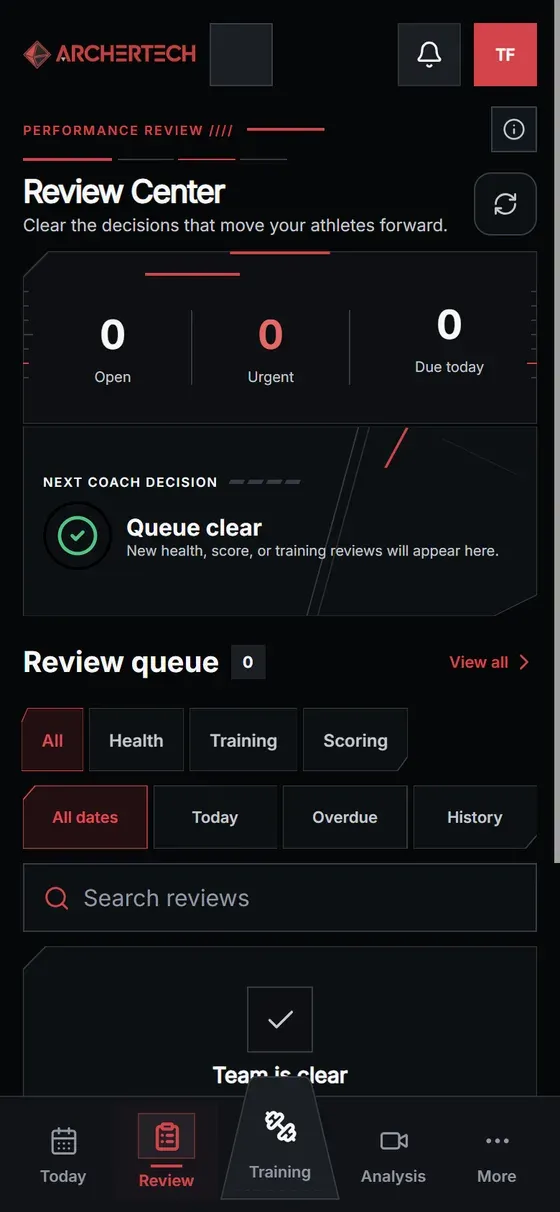
On this screen
- Review CenterThe page heading, with a button to refresh the inbox.
- Queue countsOpen, Urgent and Due today show how many decisions are waiting.
- Next decisionNEXT COACH DECISION shows the top item, with Review now to open it.
- Type and date filtersSwitch between All, Health, Training and Scoring, then narrow by date or search.
- Review queueItems are grouped under TODAY and EARLIER; tap one to open its preview and decide.
Work through the queue
- Open the Review tab. The red badge counts what is still waiting.
- Filter by Health, Training or Scoring, and by date: Today, Overdue or History.
- Tap an item to open its preview.
Decide on a health check-in
- Choose Cleared, Modify load, No shooting or Medical review.
- Add instructions or a monitoring note.
- Tap Save health review. The athlete sees your decision.
Close a training log or scorecard
- Tap Mark reviewed when it is fine, or Follow-up when the athlete needs to act.
- Use Message athlete to talk it through, or Open full review to see the whole entry.
Every decision waiting for the coaching team: health check-ins, training logs and scorecards athletes submit.
On this screen
- Review CenterThe page heading, with a button to refresh the inbox.
- Queue countsOpen, Urgent and Due today show how many decisions are waiting.
- Next decisionNEXT COACH DECISION shows the top item, with Review now to open it.
- Type and date filtersSwitch between All, Health, Training and Scoring, then narrow by date or search.
- Review queueItems are grouped under TODAY and EARLIER; tap one to open its preview and decide.
Work through the queue
- Open the Review tab. The red badge counts what is still waiting.
- Filter by Health, Training or Scoring, and by date: Today, Overdue or History.
- Tap an item to open its preview.
What a manager can’t do here
- Managers can open every item and read the athlete’s report and the coach’s decision.
- Decisions, Mark reviewed and Follow-up are saved by coaches and head coaches only.