
Profile
Your athlete details and sign-in email
Your athlete details and your sign-in email. Only your name is required.
On this screen
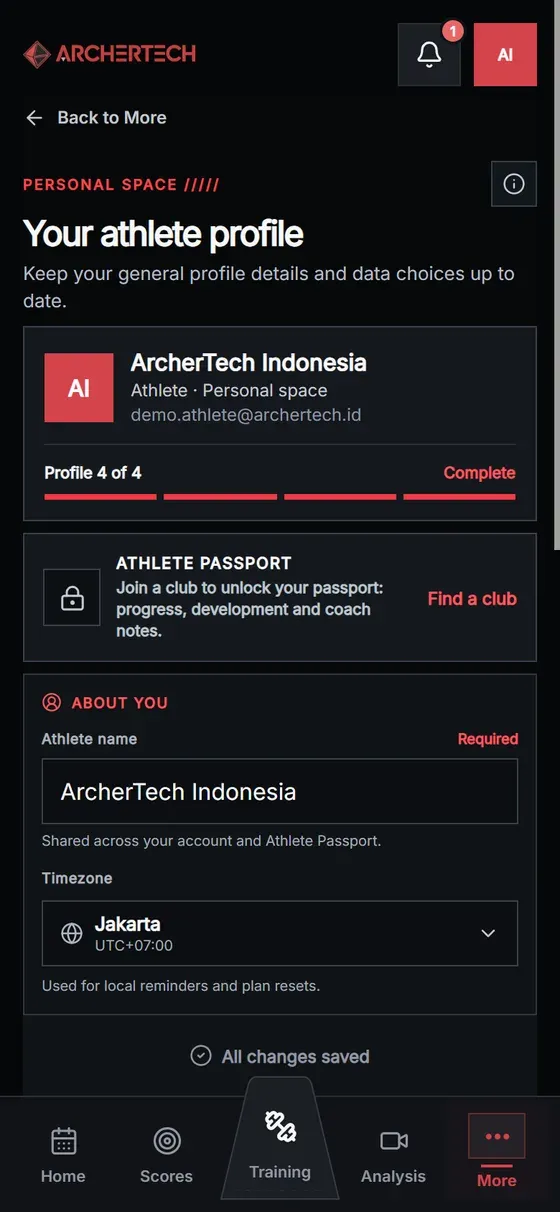
- Your identityYour initials, name, role and place, sign-in email, and Profile 4 of 4 with what to add next.
- Athlete PassportIn a club it opens your Athlete Passport; without one it is locked, with Find a club.
- About youYour name, the only required field, and your time zone.
- Account & sign-inYour sign-in email with Change: confirm with your password, then open the link sent to the new address.
- Athlete detailsProfile basics and Contact details, each showing how much is filled in.
- Your dataPersonal history and Club sharing on higher plans, and Data & privacy.
- SaveAll changes saved until you edit; then Discard or Save profile.
Complete your profile
- Open Profile basics and fill in what you like: date of birth, nationality, gender, dominant hand and division.
- Your age group is worked out from your date of birth.
- Add a contact email, phone or address under Contact details.
- Tap Save profile, or Discard to undo your edits.
Change your sign-in email
- Under Account & sign-in, tap Change.
- Enter the new email and your current password, then tap Send confirmation link.
- Open the link we send to the new address. If asked, confirm from your current email too.
- Until then you keep signing in with your current email.
Good to know
- Only your name is required; anything else can stay empty.
- Your contact email is separate from your sign-in email.
- Higher plans add your personal history and club sharing controls here.
Without a club
- The Athlete Passport unlocks when you join a club; tap Find a club to look for one.
- Your scores and videos stay private until you choose to share them.
Your athlete details and your sign-in email. Only your name is required.
On this screen
- Your identityYour initials, name, role and place, sign-in email, and Profile 4 of 4 with what to add next.
- Athlete PassportIn a club it opens your Athlete Passport; without one it is locked, with Find a club.
- About youYour name, the only required field, and your time zone.
- Account & sign-inYour sign-in email with Change: confirm with your password, then open the link sent to the new address.
- Athlete detailsProfile basics and Contact details, each showing how much is filled in.
- Your dataPersonal history and Club sharing on higher plans, and Data & privacy.
- SaveAll changes saved until you edit; then Discard or Save profile.
Complete your profile
- Open Profile basics and fill in what you like: date of birth, nationality, gender, dominant hand and division.
- Your age group is worked out from your date of birth.
- Add a contact email, phone or address under Contact details.
- Tap Save profile, or Discard to undo your edits.
Change your sign-in email
- Under Account & sign-in, tap Change.
- Enter the new email and your current password, then tap Send confirmation link.
- Open the link we send to the new address. If asked, confirm from your current email too.
- Until then you keep signing in with your current email.
Good to know
- Only your name is required; anything else can stay empty.
- Your contact email is separate from your sign-in email.
- Higher plans add your personal history and club sharing controls here.
Your name as your club sees it, your sign-in email, and how you coach.
On this screen
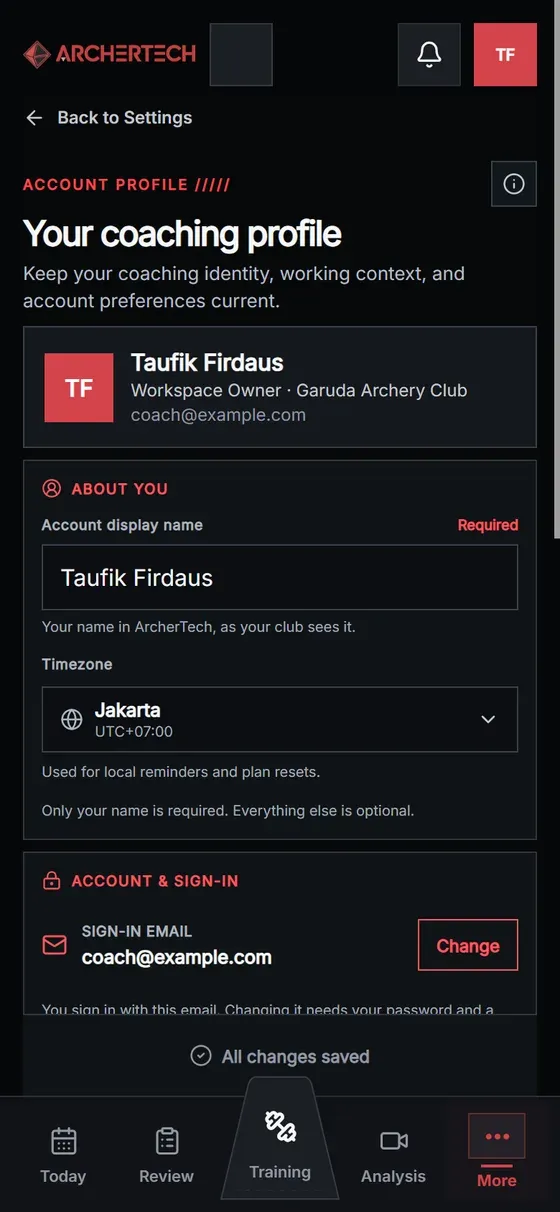
- Your identityYour initials, name, role and workspace, and your sign-in email.
- About youYour display name, the only required field, and your time zone.
- Account & sign-inYour sign-in email with Change: confirm with your password, then open the link sent to the new address.
- Coaching identityA short coaching bio and focus; managers fill in Staff role instead. Both are optional.
- Workspace accessYour role and workspace; workspace owners also open Workspace and Plan & Billing from here.
- SaveAll changes saved until you edit; then Discard or Save profile.
Edit your profile
- In Settings, tap Manage profile.
- Update your name, time zone and coaching or staff details.
- Tap Save profile, or Discard to undo your edits.
Change your sign-in email
- Under Account & sign-in, tap Change.
- Enter the new email and your current password, then tap Send confirmation link.
- Open the link we send to the new address. If asked, confirm from your current email too.
- Until then you keep signing in with your current email.
Good to know
- Only your name is required.
- Your profile is visible only to members of your workspace.
Your name as your club sees it, your sign-in email, and how you coach.
On this screen
- Your identityYour initials, name, role and workspace, and your sign-in email.
- About youYour display name, the only required field, and your time zone.
- Account & sign-inYour sign-in email with Change: confirm with your password, then open the link sent to the new address.
- Coaching identityA short coaching bio and focus; managers fill in Staff role instead. Both are optional.
- Workspace accessYour role and workspace; workspace owners also open Workspace and Plan & Billing from here.
- SaveAll changes saved until you edit; then Discard or Save profile.
Edit your profile
- In Settings, tap Manage profile.
- Update your name, time zone and coaching or staff details.
- Tap Save profile, or Discard to undo your edits.
Change your sign-in email
- Under Account & sign-in, tap Change.
- Enter the new email and your current password, then tap Send confirmation link.
- Open the link we send to the new address. If asked, confirm from your current email too.
- Until then you keep signing in with your current email.
Good to know
- Only your name is required.
- Your profile is visible only to members of your workspace.