
Plan & Billing
Choose a plan and pay securely
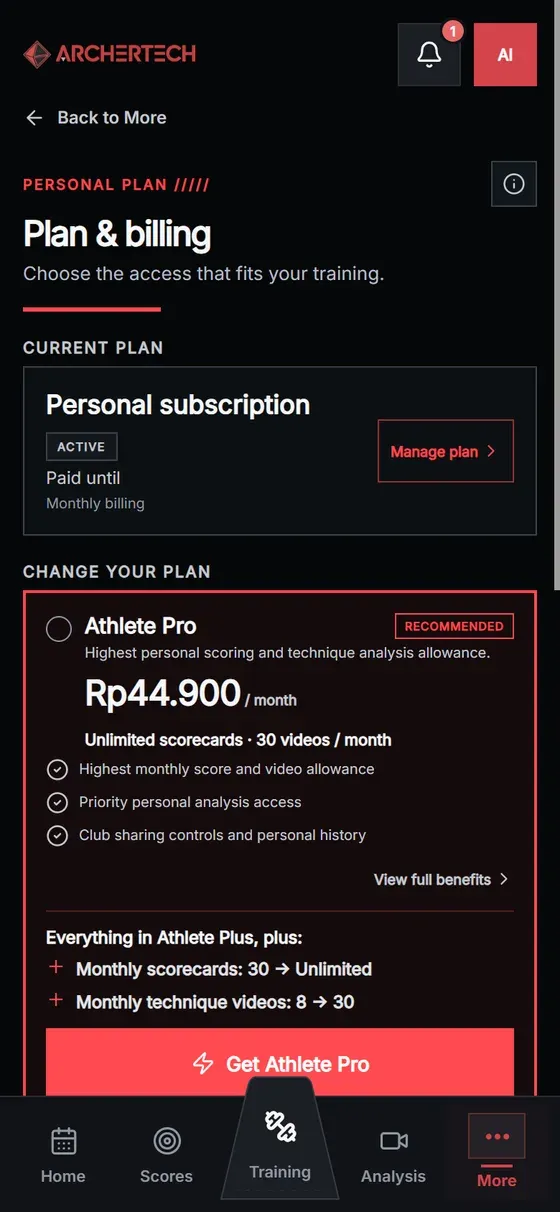
Choose a personal plan and pay securely with Midtrans.
On this screen
- Billing cycleMonthly or Yearly; Yearly shows how much it saves.
- Recommended planThe most complete plan comes first, with what it adds over the next plan and Get to buy it.
- Other plansThe other plans, each with View full benefits.
- Compare plansCOMPARE PLANS sets each plan’s limits and features side by side.
- Payment barA bar at the bottom names the plan and price and opens the review before Midtrans.
- Manage and historyManage plan shows days left, this month’s usage and Renew; PAYMENT HISTORY lists verified payments.
Choose a plan
- Pick Monthly or Yearly.
- Tap Get on a plan, or View full benefits to see its prices, monthly limits and what you gain.
- Check Your order: the plan, billing and what you pay now.
- Pay in the Midtrans checkout. Your access changes once the payment is verified.
Manage your plan
- Manage plan shows the date your plan is paid until, the days left and this month’s usage.
- Nothing renews by itself: renew from Manage plan or the reminder before your plan ends.
- To upgrade, choose a higher plan: your remaining access is credited before payment.
- If a payment didn’t finish, tap Continue payment or Try again.
- PAYMENT HISTORY lists verified payments; open one for its receipt or to request a refund.
Your athlete account and the plan your club provides.
On this screen
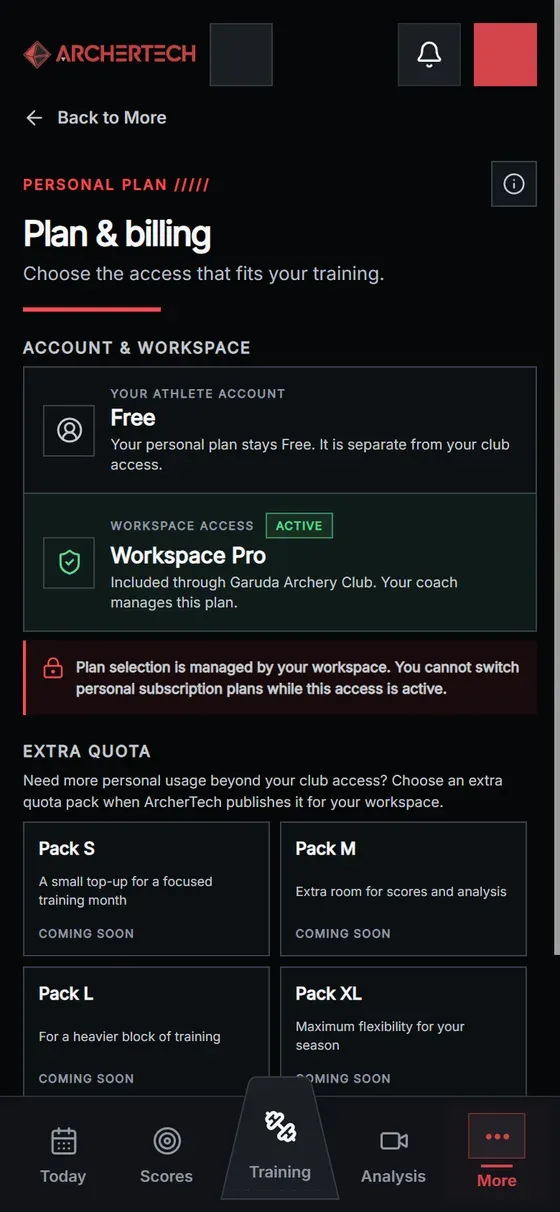
- Plan & billingA heading that invites you to choose the access that fits your training.
- Private to youA note that club staff never see your plan or payments.
- Account & workspaceYour athlete account stays Free; your club’s workspace plan is shown beside it.
- Extra quotaEXTRA QUOTA previews packs for more personal usage, marked as coming soon.
- Payment historyPAYMENT HISTORY lists verified payments, or says there are none yet.
Good to know
- Your access comes from your workspace’s plan; the club manages plan selection.
- Your plan and payments are never visible to club staff.
Each club has its own plan. This page lists the clubs you own.
On this screen
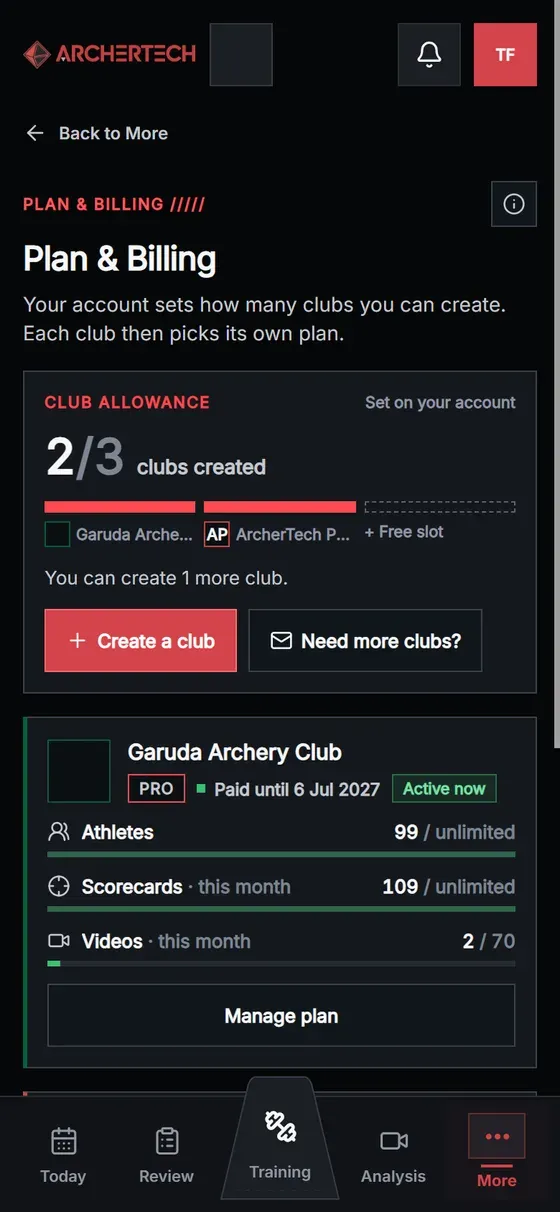
- Club limitsA heading explaining that your account sets how many clubs you can create.
- Club allowanceCLUB ALLOWANCE shows clubs created against your limit; Create a club and Need more clubs? follow.
- Your clubsOne card per club with its plan, status, and athletes, scorecards and videos against limits.
- Plan alertsWarnings for a pending payment, inactive plan or near-full capacity, each with a fix button.
- Club billing buttonEach club’s main button, such as Manage plan or Renew plan, opens its Billing tab.
Your clubs
- Your clubs shows how many club slots you have used.
- Capacity by club shows athletes, scorecards and videos for each club.
- Tap Manage Billing on a club to open its Billing tab and change the plan.
- Without a club yet, create one to choose its plan.
- Need more club slots? Contact ArcherTech.
Each club has its own plan. This page lists the clubs you own.
On this screen
- Club limitsA heading explaining that your account sets how many clubs you can create.
- Club allowanceCLUB ALLOWANCE shows clubs created against your limit; Create a club and Need more clubs? follow.
- Your clubsOne card per club with its plan, status, and athletes, scorecards and videos against limits.
- Plan alertsWarnings for a pending payment, inactive plan or near-full capacity, each with a fix button.
- Club billing buttonEach club’s main button, such as Manage plan or Renew plan, opens its Billing tab.
Your clubs
- Your clubs shows how many club slots you have used.
- Capacity by club shows athletes, scorecards and videos for each club.
- Tap Manage Billing on a club to open its Billing tab and change the plan.
- Without a club yet, create one to choose its plan.
- Need more club slots? Contact ArcherTech.