
Athlete Passport
Your progress, development and history
Your record in the club: progress, development and performance history in one place.
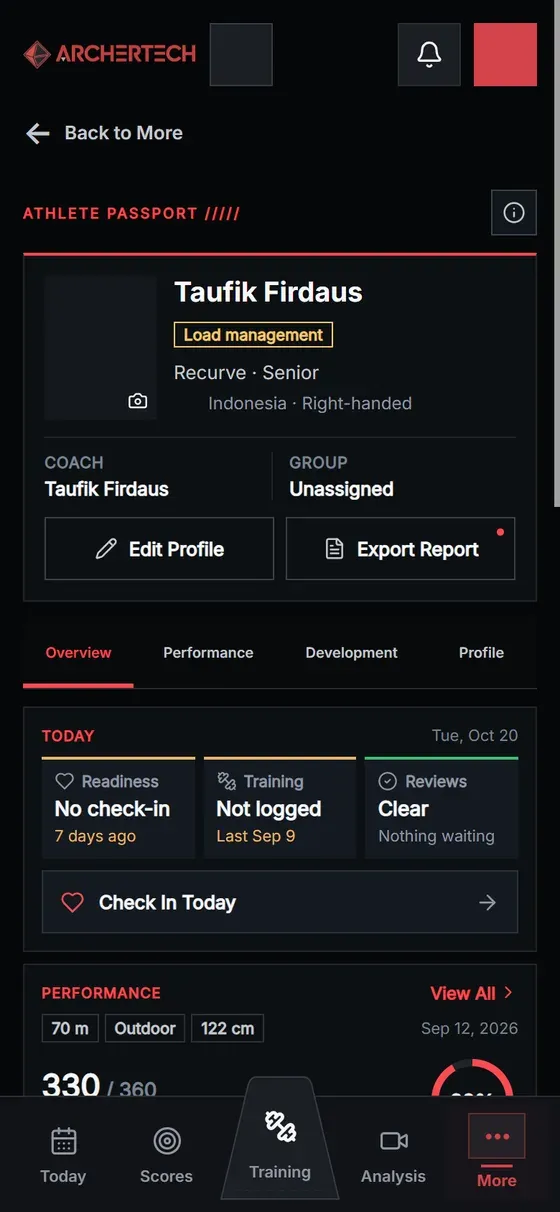
On this screen
- Passport headerYour photo and name sit under ATHLETE PASSPORT, with Edit Profile and Export Report.
- Passport tabsOverview, Performance, Development and Profile switch between the four sections.
- Today at a glanceThe Today card shows Readiness, Training and Reviews boxes, coloured by status.
- PerformancePerformance shows your Latest score, your best and a trend; View All opens the full charts.
- Season goalThe Season card holds your goal, target score and your coach’s message.
Find your way around
- Overview: today’s readiness, your season goal, equipment and recent activity.
- Performance: your score trends.
- Development: physical tests, coach evaluations, skills and achievements your coach records.
- Profile: shooting notes, equipment, contact details and coach feedback.
Keep your details current
- Tap Edit Profile to update your profile.
- In Profile, update your equipment and contact details.
- Tap your photo, then Change Photo to replace it.
Suggest a skill
- Open Development, then Skills.
- Add a skill you’ve worked on. Your coach accepts or edits it.
- Changed your mind? Tap Withdraw.
Export your report
- Tap Export Report.
- Choose This season, Last 90 days or All time.
- Pick PDF report or Excel workbook.
Good to know
- Shooting notes are your diary. Your coach sees only the entries you share with coaches.