
Join a club
Get a coach’s plan, feedback and messages
Joining a club adds your coach’s training plan, feedback, messages and the Health Center.
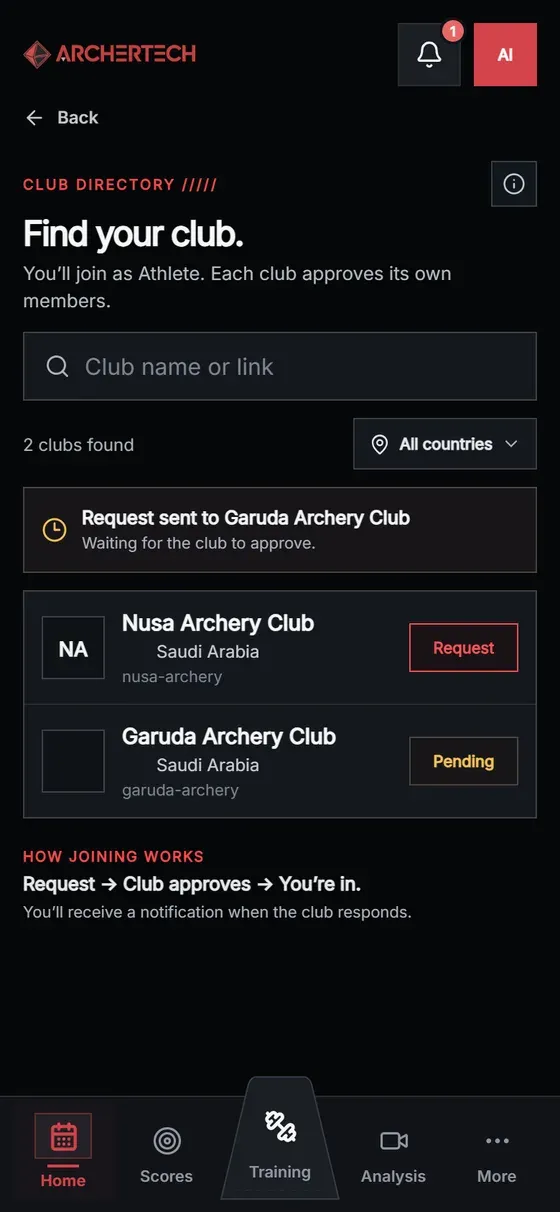
On this screen
- Club directoryCLUB DIRECTORY introduces the search and shows the role you will join as.
- Search and filterSearch by club name or link, and narrow the list with All countries.
- Club resultsEach club shows its logo, name, country and link; tap the row or Request to ask to join.
- Request sheetAdd an OPTIONAL MESSAGE to the club, then tap Send request.
- Pending requestsA waiting request shows at the top as Request sent to …, and its club is marked Pending until the club replies.
Ask to join
- Search under Find your club on Home, or tap Find a club in More.
- Search by club name or workspace URL, or filter by country.
- Open the club, add an optional message and tap Send request.
- While you wait, Home shows your request as In review; tap View request to check it.
How joining works
- Send a request to the club.
- The club approves your request.
- Your coach shares plans, feedback and reviews with you.
Good to know
- Your request stays pending until the club approves or declines it.