
Health Center
Your daily health check-in
A daily check-in on how your body feels, so your coach can adjust training.
On this screen
- Health headerHEALTH CENTER ///// and Your daily health check-in. head the page, with a History link.
- Guidance and privacyCHECK-IN GUIDANCE shows your readiness and advice; PRIVACY lets you keep a check-in personal.
- Check-in stepsThe steps How you feel, Pain / body and Review guide you from start to save.
- How you feelHow are you feeling? has sliders for sleep, energy, mood, soreness, stress and pain.
- Body map and savePAIN / BODY holds a body map for sore areas; Review checks answers before Save check-in.
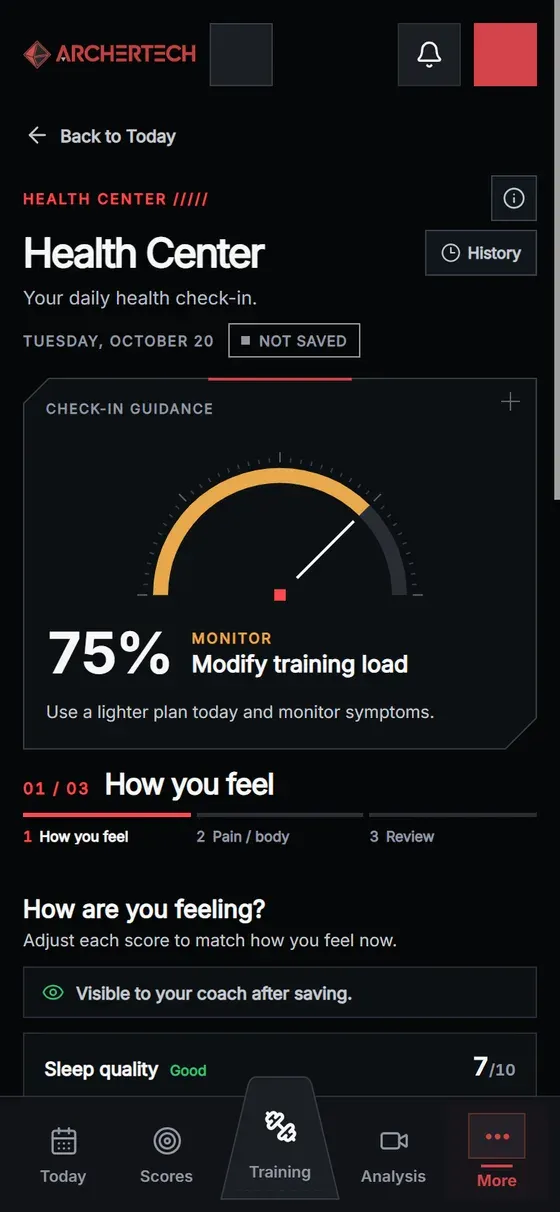
Do today’s check-in
- Rate sleep, energy, mood, soreness, stress and pain, and choose your training availability.
- Tap Review symptoms.
- Choose No pain today, or Report pain and tap each sore area on the body map with a 0 to 10 level.
- Tap Continue to review, check your answers and tap Save check-in.
Good to know
- Only today’s check-in can be edited; earlier days are read-only.
- In a club, your check-ins are shared with your coaches automatically. To hide one, tap Keep this one personal under PRIVACY.
- History shows past check-ins and your coach’s decision on each.
- After a high-risk answer, the app asks you to confirm before saving.
Your team’s health at a glance, and the decision on each athlete’s check-in.
On this screen
- Team health headerTEAM HEALTH with today’s date and Team health center head the page.
- Check-ins todayREADINESS BOARD shows a dial of today’s check-ins split by status, one square per athlete, the team’s 7-day readiness and a Check in an athlete button.
- Next decisionNEXT COACH DECISION shows the most urgent athlete with their numbers and 7-day trend; tap Review now.
- Priority queuePRIORITY QUEUE lists the athletes under Needs a coach decision; tap one to open their review.
- Not checked inNOT CHECKED IN TODAY shows athlete chips; tap one to check that athlete in.
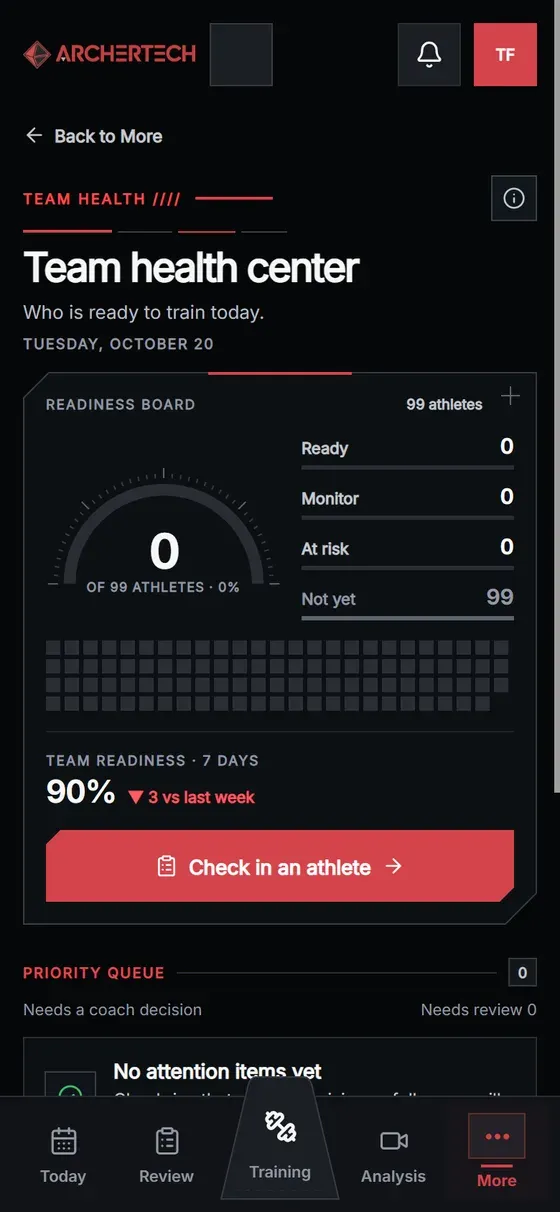
See who needs attention
- READINESS BOARD shows who checked in today and how ready the team is.
- PRIORITY QUEUE lists the athletes to look at first; tap View result.
Open an athlete
- Tap Select athlete and search by name or athlete code.
- Use the tabs Check-in, Body, Review and History.
Decide on a check-in
- Open the Review tab and read the athlete’s report.
- Choose a decision: Cleared, Modify load, No shooting or Medical review.
- Add a coach note and tap Save health review. The athlete sees it.
- You can also fill in Check-in and Body on an athlete’s behalf and save it.
Your team’s health at a glance, and the decision on each athlete’s check-in.
On this screen
- Team health headerTEAM HEALTH with today’s date and Team health center head the page.
- Check-ins todayREADINESS BOARD shows a dial of today’s check-ins split by status, one square per athlete, the team’s 7-day readiness and a Check in an athlete button.
- Next decisionNEXT COACH DECISION shows the most urgent athlete with their numbers and 7-day trend; tap Review now.
- Priority queuePRIORITY QUEUE lists the athletes under Needs a coach decision; tap one to open their review.
- Not checked inNOT CHECKED IN TODAY shows athlete chips; tap one to check that athlete in.
Open an athlete
- Tap Select athlete and search by name or athlete code.
- Use the tabs Check-in, Body, Review and History.
What a manager can’t do here
- Check-ins, decisions and coach notes are read-only for managers, and the team overview stays empty.