
Coach Feedback
Read your coach’s reviews
Your coach’s reviews of your check-ins, training, scores and videos.
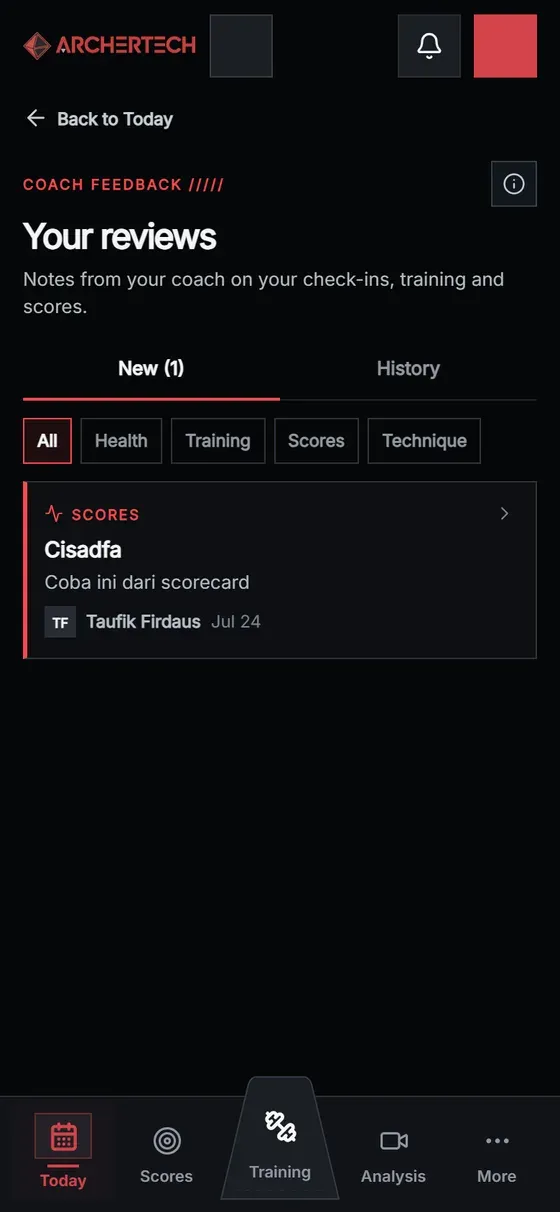
On this screen
- Your reviewsA back link and Your reviews head the page, with a note on what appears here.
- New and historyNew shows unread reviews with a count; History keeps the ones you have read.
- Topic filtersPills for All, Health, Training, Scores and Technique narrow the list.
- Review cardsEach card shows the topic, coach and date; unread ones carry a red edge.
- Feedback detailTapping a card opens your coach’s note, a link to the reviewed entry and Got It.
Read a review
- Open New to see unread reviews; filter by Health, Training, Scores or Technique.
- Tap a review to read your coach’s note.
- Tap the entry card to open what was reviewed.
- Tap Got It. The review moves to History.
Good to know
- To answer your coach, use Messages.