
Athlete Database
Find, add and organise athletes; open their passport
Every athlete in the workspace: find them, keep their records tidy and open their passport.
On this screen
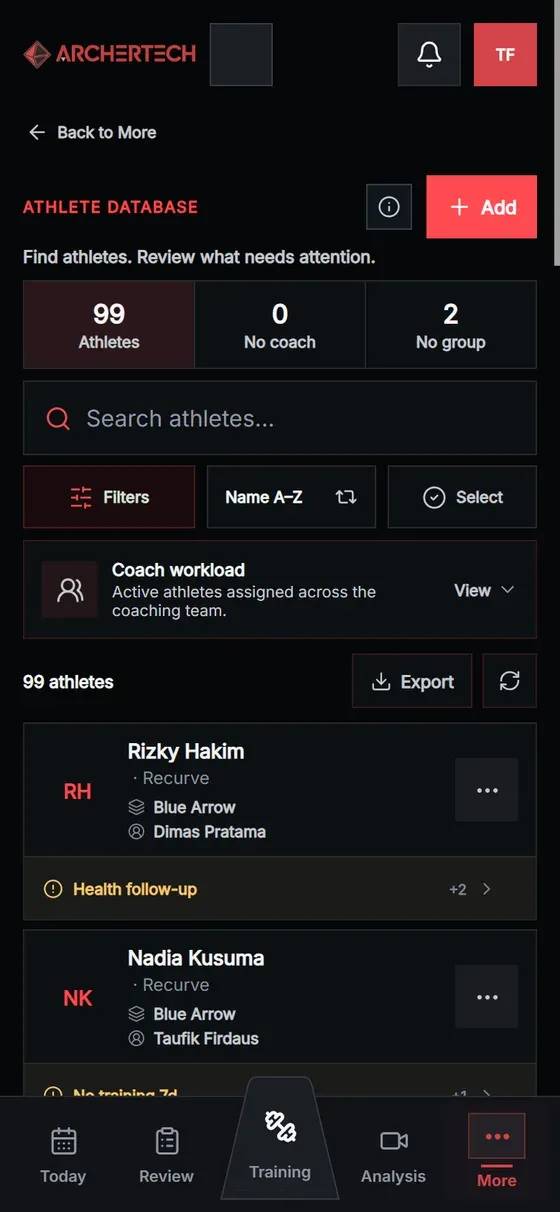
- Database headerATHLETE DATABASE heads the page, with an Add button for new athletes.
- Search and toolsSearch athletes, then use Filters, Select and Export to narrow, edit or export the list.
- Quick viewsNo coach and No group pills show gaps; Saved views keeps your favourite filters.
- Athlete rowsEach row shows an athlete’s name, group and coach; its menu opens Open Athlete Passport.
- Coach workloadCoach workload counts the active athletes assigned to each coach.
Find athletes
- Search by name, or tap Filters.
- Use the No coach and No group views to spot gaps, and the sort button to reorder.
- With a filter applied, keep it with Saved views, then Save current.
Add an athlete
- Tap Add.
- Fill in identity, assignment (group and coach) and details, tapping Continue between steps.
- Tap Save athlete. The athlete code is assigned for you.
Edit many athletes at once
- Tap Select, then tick athletes or Select all shown.
- Choose Group, Coach, Performance or Roster and pick the new value.
Export the roster
- Tap Export and choose Export as PDF or Export as Excel.
- Optionally group the list by bow type, group, age category or gender.
- Export works in the web app.
Work in an athlete’s passport
- Open an athlete’s actions menu and tap Open Athlete Passport.
- Update the season goal and current focus, and add a message for the athlete.
- In Development, record physical tests, coach evaluations (five areas, up to three priorities), skills and achievements.
- In Profile, open Coach feedback and tap Add feedback: choose a category, Private or Shared, and a follow-up date if needed.
- Saving an athlete’s equipment as a coach marks the setup as verified.
- Export Report creates a PDF or Excel report for a chosen period.
Every athlete in the workspace: find them, keep their records tidy and open their passport.
On this screen
- Database headerATHLETE DATABASE heads the page, with an Add button for new athletes.
- Search and toolsSearch athletes, then use Filters, Select and Export to narrow, edit or export the list.
- Quick viewsNo coach and No group pills show gaps; Saved views keeps your favourite filters.
- Athlete rowsEach row shows an athlete’s name, group and coach; its menu opens Open Athlete Passport.
- Coach workloadCoach workload counts the active athletes assigned to each coach.
Find athletes
- Search by name, or tap Filters.
- Use the No coach and No group views to spot gaps, and the sort button to reorder.
- With a filter applied, keep it with Saved views, then Save current.
Add an athlete
- Tap Add.
- Fill in identity, assignment (group and coach) and details, tapping Continue between steps.
- Tap Save athlete. The athlete code is assigned for you.
Edit many athletes at once
- Tap Select, then tick athletes or Select all shown.
- Choose Group, Coach, Performance or Roster and pick the new value.
Export the roster
- Tap Export and choose Export as PDF or Export as Excel.
- Optionally group the list by bow type, group, age category or gender.
- Export works in the web app.
What a manager can’t do here
- In a passport, managers read only: no profile edits, goals, tests, evaluations, skills, achievements, coach feedback or report export.